AutoGLM Deployment Guide for Phone Agent Setup
This AutoGLM deployment guide explains how to prepare a supervised phone agent: connect a controlled Android or HarmonyOS device, choose a compatible model endpoint, define a bounded first task, and keep approval gates around sensitive actions. Use it as a planning guide alongside the current instructions in the official project repository.
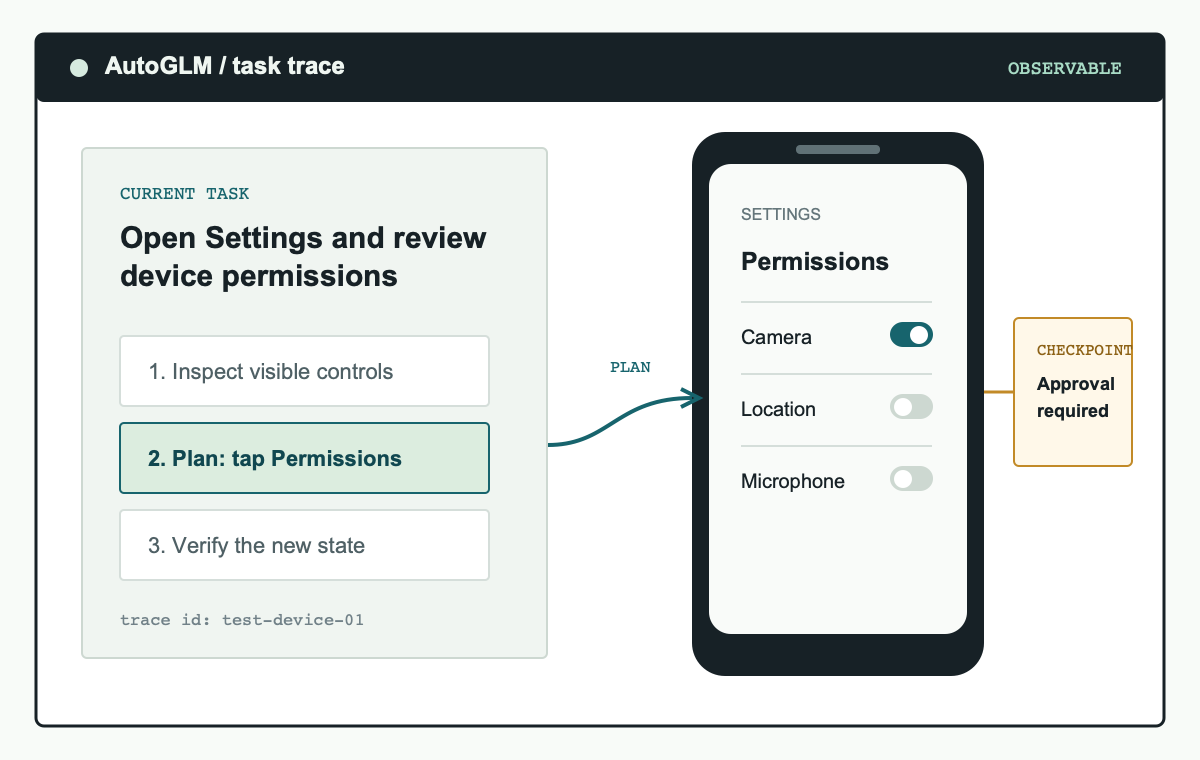
A supervised deployment loop: inspect the screen, plan a bounded action, execute on a controlled device, and verify the result.
What this AutoGLM deployment guide covers
An AutoGLM deployment is more than installing a package or connecting a phone. It joins four pieces: a supported device, a device-control connection, a model endpoint, and an operator-defined task. The framework reads the active screen, plans the next action, and applies that action through the connected device tooling. A useful deployment keeps each part visible so a developer can tell whether a problem comes from the screen, the task, the model, or the device connection.
Use this AutoGLM deployment guide to set the operating boundary before the first task. Decide which device is in scope, which apps the agent may open, what result the task should reach, and where the run must stop. This makes the first experiment safer and produces evidence that is useful when the interface or model changes later.
Important scope: AutoGLM is a developer framework for supervised phone automation. It should not be treated as a promise of unattended access to every mobile application or every account state. Login, MFA, payments, account recovery, and credential entry remain operator-controlled steps.
AutoGLM deployment guide: prepare the device
Start with a device you can reset, inspect, and disconnect. An emulator is useful for repeatable tests; a dedicated physical device is useful when the workflow depends on real hardware behavior. Avoid a primary phone, a production administrator account, or an environment with private messages, password managers, financial apps, or personal credentials. The goal is to reduce the effect of an unexpected action while you learn how the agent behaves.
Android AutoGLM deployment typically uses Android Debug Bridge, commonly called ADB. HarmonyOS workflows use HDC. Both require the device to trust the host computer. Confirm the connection before involving the model so that a device-control issue is not mistaken for a reasoning issue. Revoke old debugging authorizations and make sure the target shown by your tooling is the intended test device.
- Prepare a clean test environment. Install only the applications and accounts required by the first task. Use public or test data where possible.
- Connect with authorized tooling. For Android, install platform-tools, enable USB debugging, and verify the device with
adb devices. For HarmonyOS, configure HDC and verify the target connection. - Confirm input support. Follow the official project setup for device text input when the task needs it. Test input independently before evaluating the agent.
- Restrict the network boundary. Keep ADB or remote device access on a trusted USB connection or private network. Do not expose debugging services publicly.
git clone https://github.com/zai-org/Open-AutoGLM.git
cd Open-AutoGLM
pip install -r requirements.txt
pip install -e .
adb devices
These commands are a basic connection check, not a complete production recipe. The official Open-AutoGLM repository is the source of truth for current dependency versions, device prerequisites, model-serving parameters, and license details. Use this AutoGLM deployment guide to plan the sequence around those current commands.
AutoGLM deployment guide: choose a model endpoint
Choose the model according to the language and visual content of the interface the agent must read. The base AutoGLM-Phone-9B model is documented for Chinese-language mobile applications. The multilingual variant is intended for English and other non-Chinese content. This choice does not change the need for a controlled device or an approval boundary, but it affects the screens and prompts you should use in the first evaluation.
| Decision | What to use | What to verify |
|---|---|---|
| Primarily Chinese app and task | Begin evaluation with AutoGLM-Phone-9B. | Chinese labels, task prompts, system dialogs, and the target screen state. |
| English or mixed-language workflow | Begin evaluation with AutoGLM-Phone-9B-Multilingual. | English labels, alternate locales, embedded web content, and permission dialogs. |
| Unknown interface mix | Run the same small task set with both models. | Element selection, task fidelity, unexpected actions, manual takeover, and correct stops. |
A good AutoGLM deployment records the endpoint selected, the model version, the device state, and the task prompt. Include an error screen and a similar-looking control in the evaluation, not only a happy path. This AutoGLM deployment guide uses that evidence to distinguish a screen-reading issue from a task-design or device-connection issue.
Read the AutoGLM-Phone-9B vs Multilingual comparison guide.
AutoGLM deployment guide: run the first task
The first task should be observable, reversible, and small enough for a person to evaluate. Opening a named application, navigating to a public screen, searching a known phrase, or reporting a visible status are useful choices. Do not begin with a task that sends messages, edits account details, grants permissions, installs software, reveals private information, or spends money.
Write the objective so that another person can check whether the run stayed in bounds. State the app, the intended result, allowed actions, and the stop condition. For example: open the settings application, navigate to a named page, report the visible permission status, and stop before changing anything. A strong AutoGLM deployment guide should make the intended boundary as clear as the intended result.
Save the prompt, screenshots, action trace, model endpoint, and result. When the agent takes an unexpected branch, reduce the task first. Do not grant broader device access or disable confirmation just to make the next run finish. That approach protects the test environment and makes debugging faster.
AutoGLM deployment guide: configure safety checks
An AutoGLM deployment needs a boundary between a proposed action and a consequential action. Require human review before data leaves the device, an account changes, a permission is granted, a message is sent, a purchase is made, or a new application is installed. The operator should see the relevant final screen, recipient, account, and effect before approving anything irreversible.
Prompt injection matters when a task reads untrusted web pages, messages, documents, or application content. Treat instructions discovered on screen as data, not as a replacement for the original task. Keep the agent's allowed apps and actions narrow, avoid placing credentials in a context it can read, and maintain a clear way to disconnect the device or end the run.
- Use a test device, emulator, or separate device profile.
- Limit the run to named applications and known accounts.
- Define actions that require approval and actions the agent must never perform.
- Keep task prompts, screenshots, and action traces for review.
- Stop and reduce scope after unexpected behavior.
Read the AutoGLM security and prompt-injection guide.
AutoGLM deployment guide: troubleshoot methodically
When a task fails, first identify which part of the deployment is failing. A missing device connection, unauthorized debugging host, unavailable input method, or incorrect endpoint is different from a model that chose the wrong button. Avoid changing multiple variables at once. Capture the last visible screen, the requested action, and the exact device connection state before retrying.
| Symptom | First check | Safe next step |
|---|---|---|
| Target device is not available | Verify ADB or HDC authorization and the active device identity. | Reconnect only the intended test device and confirm the connection before rerunning. |
| Text entry or tap does not work | Check the official input setup and a direct manual device test. | Fix the device-control path before changing the model or prompt. |
| Model selects the wrong visible control | Review the screenshot, interface language, prompt wording, and similar controls. | Use a smaller task and representative screen set to isolate the reading or planning issue. |
| Agent reaches a sensitive screen | Confirm whether the task boundary requires a human approval checkpoint. | Stop the run and redesign the task to pause before that action. |
A deployment log turns future maintenance into a repeatable process. When an app redesigns a screen or the model endpoint changes, rerun the same small test set and compare the resulting traces. The AutoGLM deployment guide process is more reliable than assuming the original setup remains compatible forever.
AutoGLM deployment guide FAQ
How do I deploy AutoGLM on Android?
Prepare a controlled Android device or emulator, install the project requirements from the official repository, authorize the host through ADB, verify the connection, configure the required model endpoint, and start with one reversible supervised task.
What is required for AutoGLM ADB setup?
You need Android platform-tools, USB debugging enabled on the intended test device, a trusted host authorization, and a successful connection check with adb devices. Keep the connection private and revoke authorizations you no longer use.
Can I deploy AutoGLM on a personal phone?
Do not use a personal phone for the first deployment. A test device, emulator, or separate profile limits the effect of a mistaken action and makes the environment easier to reset and evaluate.
Where do I find current AutoGLM installation commands?
Use the official project repository for the current commands and requirements. This guide explains the surrounding deployment choices, first-task boundary, and troubleshooting process.