AutoGLM-Phone-9B deployment: what to prepare before your first run
AutoGLM-Phone-9B is an open-source phone-agent model for developers who need to test supervised Android or HarmonyOS workflows. This guide explains the deployment decisions that matter first: choosing the right model variant, connecting a controlled device, serving the model, and keeping a person in charge of sensitive actions.
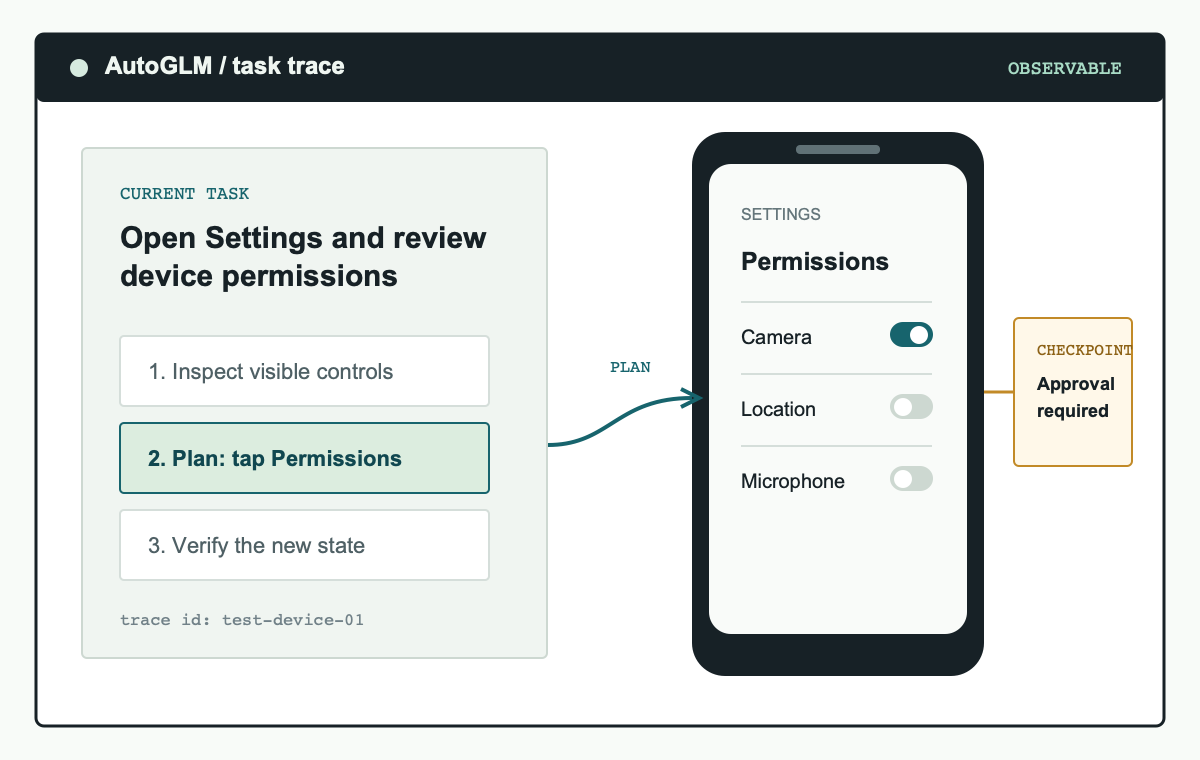
Workflow illustration: inspect the visible interface, plan a bounded action, execute it on a test device, and review the result.
What AutoGLM-Phone-9B changes for phone-agent development
AutoGLM-Phone-9B brings the phone-agent loop into an open development workflow. Instead of treating the phone as a remote black box, the framework works from the visible screen state: the model reads the interface, proposes the next operation, the connected device tooling applies that operation, and the developer verifies what changed. That sequence is useful when an interface is dynamic and the correct next step depends on a button, prompt, or status message the agent can see.
The important expectation is not that AutoGLM-Phone-9B will autonomously complete every mobile task. A reliable deployment makes the run inspectable. It records the prompt, limits the applications that are in scope, uses a known device state, and stops when a condition is met. Those controls let a team decide whether an unexpected result came from the model, the screen, the task wording, or the device connection.
Scope first: AutoGLM-Phone-9B is a developer framework for supervised device automation. Login, MFA, payments, account recovery, credential entry, and identity checks should remain user-controlled checkpoints.
Choose the AutoGLM-Phone-9B model variant for your interface
Choose a model based on the language and layout of the screens you need to control, not on an abstract benchmark. The base AutoGLM-Phone-9B model is documented for Chinese mobile applications. AutoGLM-Phone-9B-Multilingual is intended for English and other non-Chinese interface content. The device setup and safety boundary are the same for both, but the correct first evaluation set is different.
| Model | Start here when | Validate before expanding scope |
|---|---|---|
| AutoGLM-Phone-9B | Your prompts, screen labels, and target applications are primarily Chinese. | Element recognition, task phrasing, permission dialogs, and the end condition for your workflow. |
| AutoGLM-Phone-9B-Multilingual | Your workflow includes English, another language, or a changing app locale. | Mixed-language screens, common system dialogs, and how the model handles alternate labels. |
Use representative screens rather than a single success case. Include an empty state, an error message, similar-looking controls, and the confirmation prompt that appears before a consequential action. A useful AutoGLM-Phone-9B test asks whether the agent can explain the relevant visual difference before it is allowed to act. This gives you a meaningful deployment signal without turning a model name into a guarantee.
Read the AutoGLM-Phone-9B vs. Multilingual comparison guide.
AutoGLM-Phone-9B deployment requirements
Before you run AutoGLM-Phone-9B, prepare one supported device, the relevant developer connection, a model endpoint, and a small task with a clear stop condition. Android development normally uses Android platform-tools and ADB. HarmonyOS workflows use HDC. In both cases, the machine that runs the agent must be trusted by the device and the device should be reserved for testing whenever possible.
- Prepare the host environment. Use the Python version and dependency requirements listed in the official Open-AutoGLM repository. Keep the project environment separate from unrelated production services.
- Connect a controlled device. For Android, enable USB debugging and confirm the connection with
adb devices. For HarmonyOS, configure HDC and confirm that the intended target is visible. Revoke old debugging authorizations instead of reusing unknown devices. - Install required input support. Follow the official setup notes for device input where text entry is needed. Verify this on the test device before evaluating the agent itself.
- Serve the selected model. Start the supported OpenAI-compatible endpoint. The official documentation includes serving guidance, including a vLLM path for the multilingual model.
- Define one bounded task. Name the application, desired outcome, allowed actions, and the point at which the AutoGLM-Phone-9B run must stop.
git clone https://github.com/zai-org/Open-AutoGLM.git
cd Open-AutoGLM
pip install -r requirements.txt
pip install -e .
adb devices
These commands are a connection check, not a complete production recipe. Use the official repository for current dependency versions, model-serving parameters, and project updates. A deployment becomes repeatable only when the device state, model endpoint, and task definition are recorded alongside the commands. For the broader device, endpoint, and first-task path, use the AutoGLM deployment guide.
Run a supervised first AutoGLM-Phone-9B task
The first AutoGLM-Phone-9B task should be harmless and easy to review. Good examples are opening a named app, navigating to a public screen, reading a visible setting, or searching a public phrase. Avoid workflows that send messages, alter account settings, install software, reveal personal information, or spend money. The goal of the first run is to validate the control loop, not to demonstrate maximum autonomy.
Write the task as an instruction a reviewer could evaluate. State the application, the intended result, and the stop condition. For example: open the settings application, navigate to the permissions page, report which permission is enabled, and stop before changing anything. Save the screen captures and action trace. If the model takes an unexpected branch, reduce the task rather than adding broader permissions or retrying blindly.
Safety boundaries for AutoGLM-Phone-9B deployments
A phone agent can encounter untrusted instructions in web pages, messages, search results, or app content. Treat on-screen text as task data, not as a replacement for the operator's goal. Keep USB and remote ADB access on trusted networks, use a dedicated test account where appropriate, and avoid placing credentials in a context the agent can read or transmit.
Approval checkpoints are part of a good AutoGLM-Phone-9B deployment. Require a person to review any action that sends data, changes permissions, modifies an account, accepts a legal agreement, spends money, or moves information between accounts. Keep logs long enough to review an abnormal run, and make device disconnection a simple way to stop it. These constraints improve both security and debugging quality.
- Use a test device, emulator, or separate device profile.
- Restrict the run to the apps and accounts required by the task.
- Define actions that need approval and actions the agent must never perform.
- Capture task prompts, screenshots, and action traces for review.
- Stop and shrink the task after unexpected behavior rather than widening access.
Read the AutoGLM security and prompt-injection guide.
AutoGLM-Phone-9B deployment FAQ
Can AutoGLM-Phone-9B automate every Android or HarmonyOS app?
No. Results depend on the model, the language and structure of the interface, device authorization, application state, and task definition. Validate AutoGLM-Phone-9B against a representative test set before treating a workflow as dependable.
Should I use a personal phone for the first deployment?
No. Use a test device, emulator, or isolated profile. It reduces the impact of a mistaken action and gives you a stable environment for comparison between runs.
Where should I get the current installation commands?
Use the official repository as the source of truth for setup, dependencies, model files, and license terms. This guide explains the deployment decisions around those commands.