Observe the interface
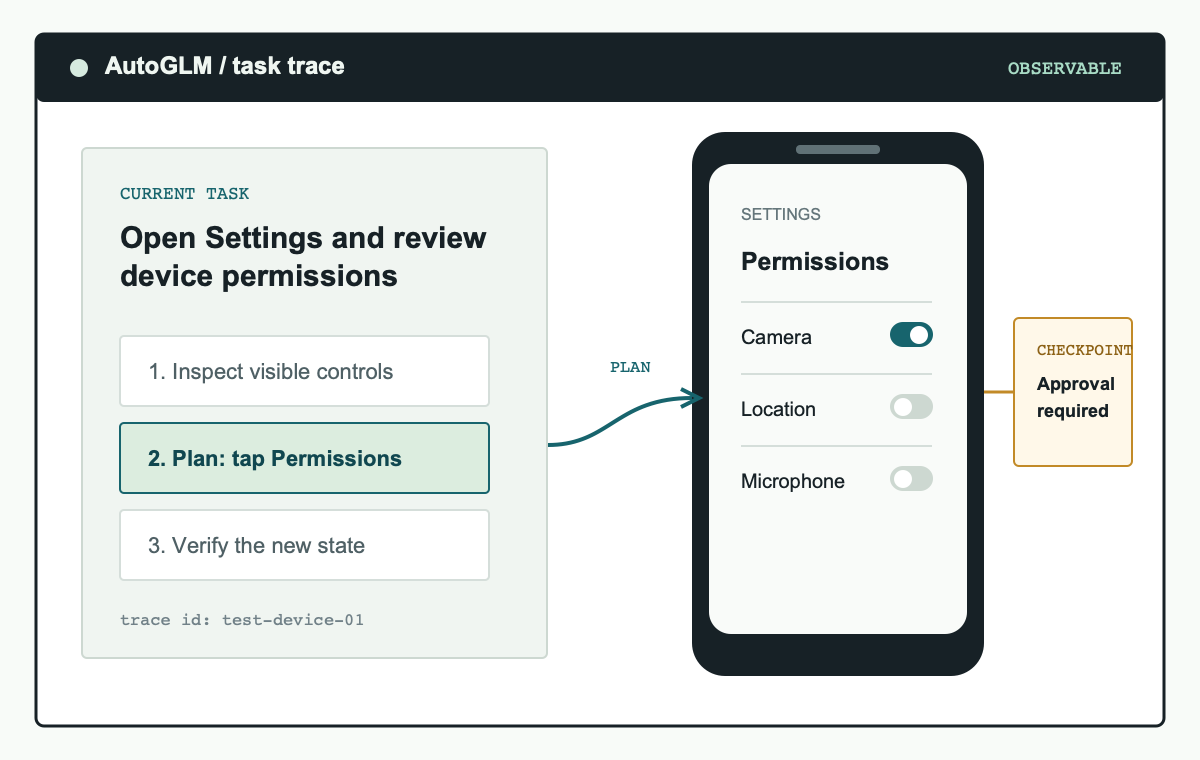
AutoGLM uses the current screen as task context. This makes it suited to workflows where the next step depends on visible controls, status messages, or a change caused by the prior action.
Independent developer resource
AutoGLM turns a plain-language task into observable Android or HarmonyOS device actions. It is a developer framework for testing, supervising, and improving phone automation, not a promise of unattended access to every app.
The practical model
AutoGLM is built around a simple requirement: every device action should be understandable to the person operating the system. A phone agent receives a task, reads the active screen, decides on a next action, performs that action through the connected device tooling, and checks the result. That loop gives developers a concrete place to inspect failures instead of treating the agent as a black box.
For a developer, the value is not simply that a task can be completed. It is that the task can be reproduced against a known device state, revised when an interface changes, and stopped before a sensitive transition. AutoGLM is therefore best approached as an engineering component for supervised mobile workflows. Start with the visible state, the permitted actions, and the evidence an operator needs after each run.
AutoGLM uses the current screen as task context. This makes it suited to workflows where the next step depends on visible controls, status messages, or a change caused by the prior action.
The agent can break a request into a sequence of device operations. Keep tasks bounded so a developer can evaluate each transition and define a useful stop condition.
Android workflows use ADB, while HarmonyOS workflows use HDC. Both paths need authorized device access and should begin on a test device or emulator.
Authentication, payments, account changes, messages, and data submission are decision points. Design the workflow so an operator can review or take over before those actions happen.
From task to device
An AutoGLM deployment has four moving parts: a supported device, a control connection, a model endpoint, and an operator-defined task. The open project documents Android Debug Bridge for Android and HarmonyOS Device Connector for HarmonyOS. The model reads the interface and proposes actions; the device tools apply them.
Keep those responsibilities separate while testing. The device connection should establish what the agent is permitted to touch. The model endpoint should be selected for the language and screens in the target workflow. The task definition should identify the application, desired result, and a condition that ends the run. This separation makes an AutoGLM failure easier to diagnose and reduces the temptation to grant broad device access just to make a demonstration work.
Start with a harmless workflow such as opening an app, navigating to a public screen, or searching for a known phrase. Use the resulting screenshots and logs to validate the agent's understanding before attempting any workflow that changes data. This staged approach produces useful debugging evidence and makes it easier to identify whether a failure came from the model, device state, or task instructions.
Authorize the test phone with ADB or HDC and confirm that the host can see it.
Provide an OpenAI-compatible model endpoint using the project-supported setup.
Write one objective, the allowed applications, and a clear stop condition.
Inspect the screen state and action history before widening the task scope.
Model selection
Model selection is a practical compatibility decision, not a benchmark contest. The base AutoGLM-Phone-9B model is documented for Chinese-language mobile interfaces. The multilingual variant is intended for English and other non-Chinese interface content. Test both the language of the task and the language of the target app before committing to a workflow.
Use a short set of representative screens rather than a single happy-path test. Include an empty state, an error state, a screen with similar controls, and any confirmation prompt the workflow may encounter. Record whether the model can describe the important visual difference before allowing it to act. This is more useful than relying on an aggregate score when you are deciding whether an AutoGLM setup suits one specific interface.
| Option | Use it when | What to validate |
|---|---|---|
| AutoGLM-Phone-9B | The target interface and task prompts are primarily Chinese. | Screen text interpretation, task phrasing, and the required device connection. |
| AutoGLM-Phone-9B-Multilingual | The workflow includes English or other non-Chinese interface text. | Representative screens, desired output language, and the same safety boundaries. |
Safer operation
Phone automation can act through interfaces that affect real accounts and real data. Treat the connected device as a controlled environment. Limit debugging access to trusted hosts, use a dedicated test account when possible, and make data-changing actions opt-in. A successful demonstration on one screen does not establish that the next screen is safe to automate.
Operational safety also improves quality. A precise allowlist, clear task scope, and well-defined approval checkpoints give the operator a way to understand an unexpected action before it becomes an incident. For teams evaluating AutoGLM, these controls should be part of the initial prototype rather than a final production hardening step.
Prompt injection is especially relevant when a task can encounter untrusted text in a browser, message, or document. Keep the task narrow, do not expose credentials to the agent, and require approval before any action that sends information, modifies settings, spends money, or crosses an account boundary.
Continue learning
Use these focused guides when you need implementation detail. Each page links to its primary source so you can distinguish this independent overview from the official project documentation.
Set up device control, a model endpoint, your first supervised task, and safety checks.
Read guide → Model deploymentRequirements, device connections, local serving, and a safe first run.
Read guide → SecurityThreat boundaries, sensitive actions, and operator controls.
Read guide → ModelsChoose a model according to the language on the phone screen.
Read guide →Common questions
No. This is an independent English-language resource site. For source code, releases, and project-specific setup instructions, use the official Open-AutoGLM repository.
No framework can guarantee reliable automation across every application state. Compatibility depends on the device, model, visible interface, authorization state, and the task. Begin with a representative test environment.
Start with an observable, reversible task on a test device. Avoid credentials, payments, personal messages, account changes, and confidential data until you have defined and tested approval controls.